In this article
A Samsung refrigerator not cooling is rarely a dead compressor. In most cases it’s an airflow problem: ice has built up on the evaporator coil, a fan has frozen or failed, or the defrost system has stopped clearing frost. These faults can be checked in under an hour with simple tools, and most fixes cost far less than people expect. Work through the steps below in order, from most likely to least likely.
Why Is My Samsung Refrigerator Not Cooling?
Samsung’s Twin Cooling design gives the fridge and freezer their own evaporators to keep humidity separate. It works well, but the fresh-food evaporator holds more moisture, and that moisture can turn into ice that blocks the fan and the air vents. Technicians diagnose these units in layers: airflow first, then the defrost system, then the electrical parts.
| Cause | How often | Typical sign | DIY level |
|---|---|---|---|
| Ice on the evaporator coil | Most common | Buzzing fan, then silence; 22E/22C fan code | Easy to test |
| Dirty condenser coils | Common | Runs nonstop, warm sides, gradual loss of cold | Easy |
| Condenser fan motor | Fairly common | Hot compressor, silent rear; 23E/23C on some models | Moderate |
| Defrost temperature sensor | Occasional | Ice keeps coming back after a defrost | Moderate |
| Inverter control board | Occasional | Lights and fans work, compressor silent | Harder |
| Compressor or sealed system | Rare | Everything runs, nothing gets cold | Pro only |
First: Rule Out Demo Mode and Settings
If the lights and display work but nothing gets cold, make sure the fridge isn’t in demo (showroom) mode, which turns cooling off. On many models you exit it by holding the Fridge and Freezer buttons, or Energy Saver and Lighting, for about 5 seconds; check your manual for your exact combination. Also confirm the fridge is set to 37–38°F and the freezer to 0°F.
Step 1: Check for Evaporator Ice Buildup
This is the number-one reason a Samsung stops cooling, especially on French-door models such as the RF28 and RF26 families. The warning sign is a loud whirring or buzzing from inside the fridge, a sound like a playing card stuck in bike spokes, followed by silence when the fan finally seizes. You may also see fan error codes like 22E or 22C on the display.
Why it happens: over time the foam insulation around the evaporator can absorb water, so the defrost heater can’t melt the ice fully. On some models the drain tube also freezes, so meltwater refreezes on the coil instead of draining away.
How to run a forced defrost test
- Press and hold the two buttons your model uses for service mode (commonly Energy Saver + Fridge, or Freezer + Lighting) for about 8–12 seconds, until the display goes blank or beeps.
- Press a button repeatedly to cycle through the options until the display shows Fd (forced defrost), then wait for it to start.
- Listen after a while: if the fan starts spinning freely and cooling returns once defrost ends, ice was the problem.
- No service mode? Empty the fridge and unplug it for 24–48 hours with the doors open, with towels on the floor.
Important: don’t just replace the fan motor. If you don’t fix the reason the ice formed, a new fan will freeze up again within a few weeks. A lasting fix is often an updated drain heater, drain clip or evaporator cover insulation, which a technician can install.
Step 2: Clean the Condenser Coils
Dusty or hairy condenser coils account for a large share of weak-cooling calls. Signs include a fridge that runs constantly, sides that feel unusually hot, and cooling that gets slowly worse over months. Homes with pets are the most common case: coils can be covered by a solid mat of fur.
- Unplug the fridge and wait about 5 minutes.
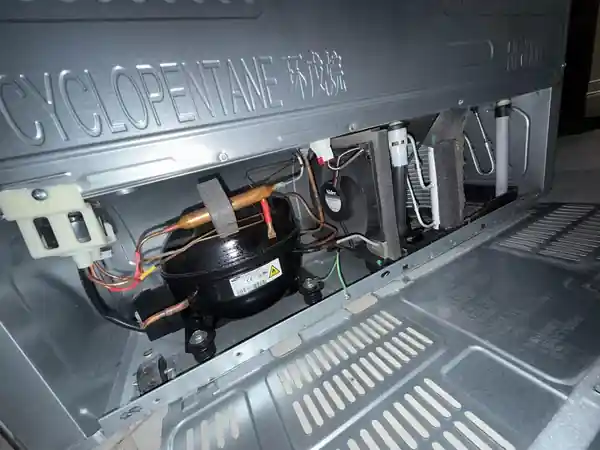
- Pull it out carefully and remove the rear lower access panel.
- Vacuum the coils and the fan area with a brush attachment, using a flashlight to see deep inside. Avoid bending the copper lines.
- Refit the panel, plug it back in, and give it 24 hours to stabilize.
It’s a 15-minute job, and it should come before any assumption that the compressor is failing.
Step 3: Test the Condenser Fan Motor
The condenser fan sits next to the compressor and keeps the coils and compressor cool. When it stops, cooling weakens or stops completely and the compressor gets extremely hot. With the rear panel off, check that the fan spins whenever the compressor runs. If the compressor is running and the fan isn’t, dust in the bearings or a burned-out motor is likely. With a multimeter, you can confirm the control board is sending DC voltage to the fan; if voltage is present and the fan doesn’t turn, replace the motor.
Step 4: Test the Defrost Temperature Sensor
This small sensor clipped to the evaporator tells the main board when the coil is clear so it can stop the defrost cycle. When moisture gets inside it, its readings drift and the board ends defrost too early, so ice keeps building. Many people replace the defrost heater when this inexpensive sensor is the real culprit.
- Set your multimeter to resistance (ohms).
- At room temperature (about 77°F), a good sensor reads roughly 5,000 ohms (5 kΩ).
- A reading far above that, or zero, means the sensor has failed.
Also test the defrost heater for continuity while you have the panel off.
Step 5: Check the Inverter Control Board
Samsung’s inverter board converts household power into variable-frequency power that drives the compressor at different speeds. When it fails, the lights work and the fans may run, but the compressor sits silent and the cabinet warms up. Look at the LED on the inverter board at the back of the fridge: a steady light usually means normal operation, while a blinking pattern is an error code (such as a start-up or voltage fault). Always check this before anyone condemns the compressor; the board costs a fraction of a compressor replacement.
Step 6: Compressor and Sealed System (Pro Only)
Real compressor failures are much less common than most people think. Replacing one requires brazing, refrigerant recovery and recharging, which needs EPA certification. Many Samsung digital inverter compressors carry a long parts warranty (often 10 years or more), so check your warranty before paying out of pocket.
Samsung Models Most Often Affected
- RF28 and RF26 French-door models: known for evaporator icing from wet insulation and frozen drain tubes.
- RFG293 series: a pattern of inverter board failures while the compressor stays healthy.
- RS265 and similar side-by-sides: prone to defrost sensor drift that lets ice block the coil.
The same diagnostic steps work across all these model families.
Samsung Fridge Repair Costs
Part prices reflect typical online prices for genuine or compatible parts; professional prices include parts and labor based on 2025–2026 U.S. repair-cost data.
| Repair | Part only (DIY) | With a technician |
|---|---|---|
| Forced defrost / coil cleaning | $0 | $75 – $150 |
| Defrost temperature sensor | $15 – $40 | $150 – $300 |
| Evaporator fan motor | $50 – $120 | $200 – $400 |
| Condenser fan motor | $40 – $100 | $150 – $350 |
| Drain heater / icing fix kit | $20 – $60 | $200 – $400 |
| Inverter control board | $150 – $250 | $300 – $600 |
| Compressor replacement | Not DIY | $800 – $1,800 (check warranty) |
Find a Samsung Fridge Repair Pro
If the ice keeps coming back, the inverter board shows an error, or the compressor is suspected, a qualified appliance technician can confirm the fault and fit the updated parts. Compare a few quotes before booking.
Find refrigerator repair companies Get free quotes Same-day service
Questions and Answers
Why is my Samsung refrigerator not cooling but the freezer works?
Samsung fridges with Twin Cooling have a separate evaporator for the fresh-food side. Ice on that coil, or a frozen fridge fan, stops cold air even while the freezer stays cold.
How do I reset a Samsung fridge that isn’t cooling?
Unplug it for 5 minutes and plug it back in to reset the controls. If the problem is ice, a full forced defrost or a 24–48-hour unplug is needed, not just a quick reset.
What does the buzzing noise in my Samsung fridge mean?
A loud buzz or flapping sound usually means the fan blades are hitting ice. Defrost the unit soon, before the fan seizes and cooling stops completely.
What do error codes 22E and 22C mean on a Samsung fridge?
They are fan error codes for the fridge compartment, most often caused by ice blocking the fan. 21E/21C relates to the freezer fan on many models.
How long does a Samsung fridge take to cool after a defrost?
Most reach a safe temperature in 6–12 hours and stabilize within 24 hours. Keep the doors closed and use Power Cool if available.
Why does the ice keep coming back after I defrost it?
The defrost system isn’t working fully. Test the defrost sensor and heater, and check that the drain isn’t freezing. Updated drain or insulation parts often fix repeat icing.
Is a Samsung compressor covered by warranty?
Many Samsung models carry a long parts warranty on the digital inverter compressor, often 10 years or more. Labor may not be included, so read your warranty terms.
Can I fix a Samsung fridge that’s not cooling myself?
Yes for defrosting, coil cleaning, sensor and fan replacement. Leave compressor and refrigerant work to a certified technician.
How much does it cost to fix a Samsung refrigerator not cooling?
Most repairs cost $150–$400 with a technician, and DIY parts are often under $100. An inverter board runs $300–$600 installed; a compressor costs more, unless the warranty covers it.
Is it worth repairing an older Samsung refrigerator?
For icing, fans, sensors and boards, usually yes. For an out-of-warranty compressor on a unit over 10 years old, compare the quote with a new fridge.
The Bottom Line
For a Samsung refrigerator not cooling, start with the cheap checks: rule out demo mode, run a forced defrost and clean the condenser coils. Treat a buzzing fan as an early warning. If ice keeps returning, fix the defrost sensor, heater or drain instead of only replacing the fan, and check the inverter board LED before anyone blames the compressor. For more general causes that apply to every brand, see our guide on why a fridge stops cooling.
About This Guide
This guide was written by David C, Senior Technical Writer at Repairior, based on hands-on appliance diagnostics and reviewed by our editorial team. Repair costs reflect published 2025–2026 U.S. pricing and typical part prices. Service-mode button combinations vary by model, so always check your owner’s manual. We update our guides when pricing or best practices change.
Compare reviewed refrigerator repair companies and request free quotes in minutes.